EAF
A calendar that tells you what it couldn't read
When Archers Hub changed De La Salle University's Enrollment Assessment Form, the tools students used to turn it into a calendar stopped working. A friend asked me for a new one. EAF Schedulr reads the EAF PDF and builds a calendar file: weekly classes with their rooms, recollections as single events, and every row it couldn't read put in front of the student instead of quietly left out.
- What it does: reads a DLSU Archers Hub EAF and builds an
.icsfile: weekly classes for the term with rooms, and each recollection as one event on the date the student picks. - Who it's for: DLSU students at the start of every term. It is unofficial and student-built, not a DLSU service.
- My part: all of it, solo: design, front end, back end and deployment, on Render's free tier.
- Outcome: live since May 2026 and used through two term starts: 75 people and 118 sessions in 2026, to 15 November. Students from several colleges confirmed it reads their own EAFs, and 59 automated tests guard the parser.
- The caveat: analytics counts visits, not calendars made, so I can't say how many students imported a term with it.
Context and constraints
Every term, a DLSU student downloads their EAF from Archers Hub: a PDF listing each course, its section, and the days, times and rooms it meets. Getting that into a calendar meant typing every class by hand, setting each one to repeat, and fixing them one by one when the schedule changed. Lasallian Recollections (LASARE) were the awkward part: they happen once, on one date, but sit on the form like any weekly class. Converters existed, but the latest EAF format broke them.
I built it alone, on Render's free tier: one small server, running as a single process because the download links live in its memory. I had also graduated in December 2025, so I had no EAF of my own. Every form I tested with came from someone else.
Two things shaped every decision after that. An EAF holds a student's name, ID number and full schedule, so nothing could be kept. And DLSU can change the form's layout in any term without notice, which is exactly what broke the old tools, so the app had to expect it to break again. As a student-built tool, it also had to look like one, never like an official DLSU service.
Listening first
The converters students already had were built for the old EAF. When Archers Hub released a new layout, they couldn't read it. That's when a friend from the Ramon V. del Rosario College of Business asked me to build a new one. Then friends, their friends and org mates from several DLSU colleges ran their own EAFs through it: upload, set the dates, download, and import into Google Calendar. Each new form tested the parser against a program it hadn't seen.
| The problem | Where it came from | What I built |
|---|---|---|
| The converters students used were built for the old EAF, and couldn't read Archers Hub's new layout | A friend from RVRCOB, who asked me to build a new one | A reader built for the new layout, which expects the format to change again and reports what it can't read |
| Typing a term into Google Calendar by hand, then editing repeating events one by one whenever the schedule changed | Students, and my own term-start routine | One upload builds the whole term; a changed schedule is just a new upload |
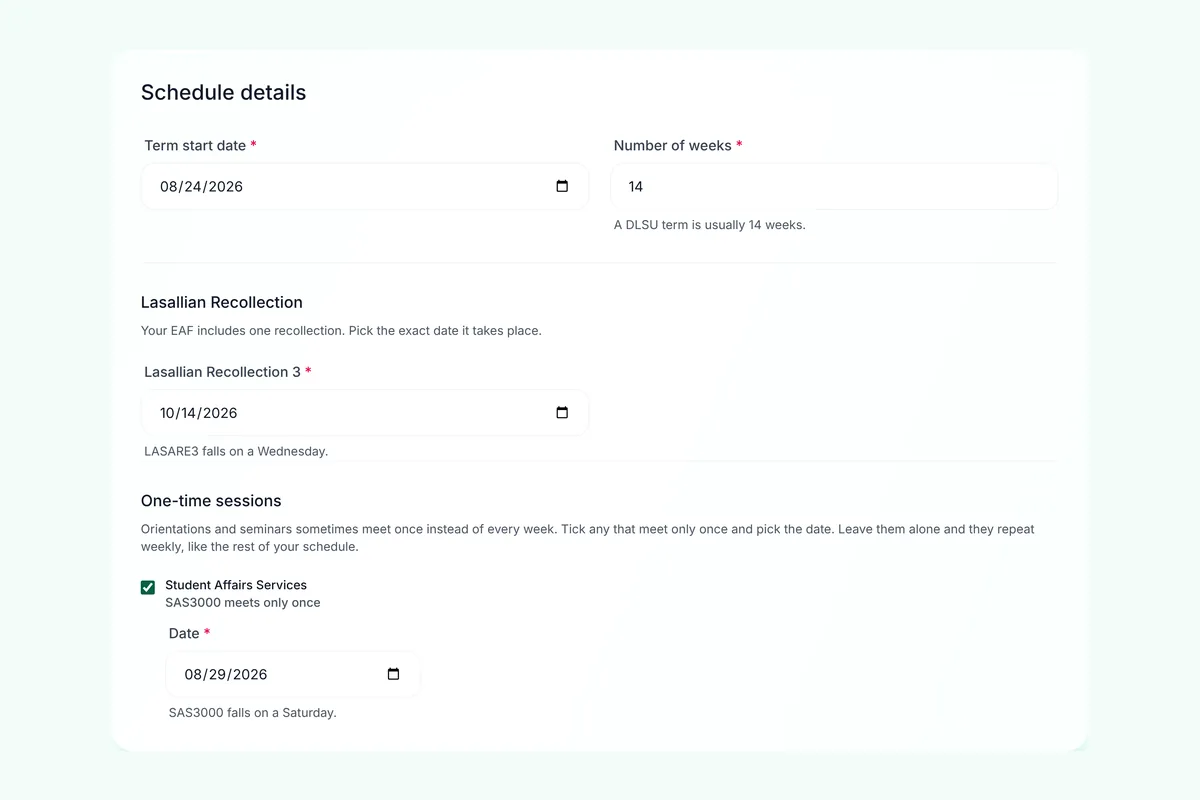
| Recollections (LASARE) should happen once, not every week | Students | Each recollection becomes one timed event, on a date the student picks and that is checked against the weekday on the form |
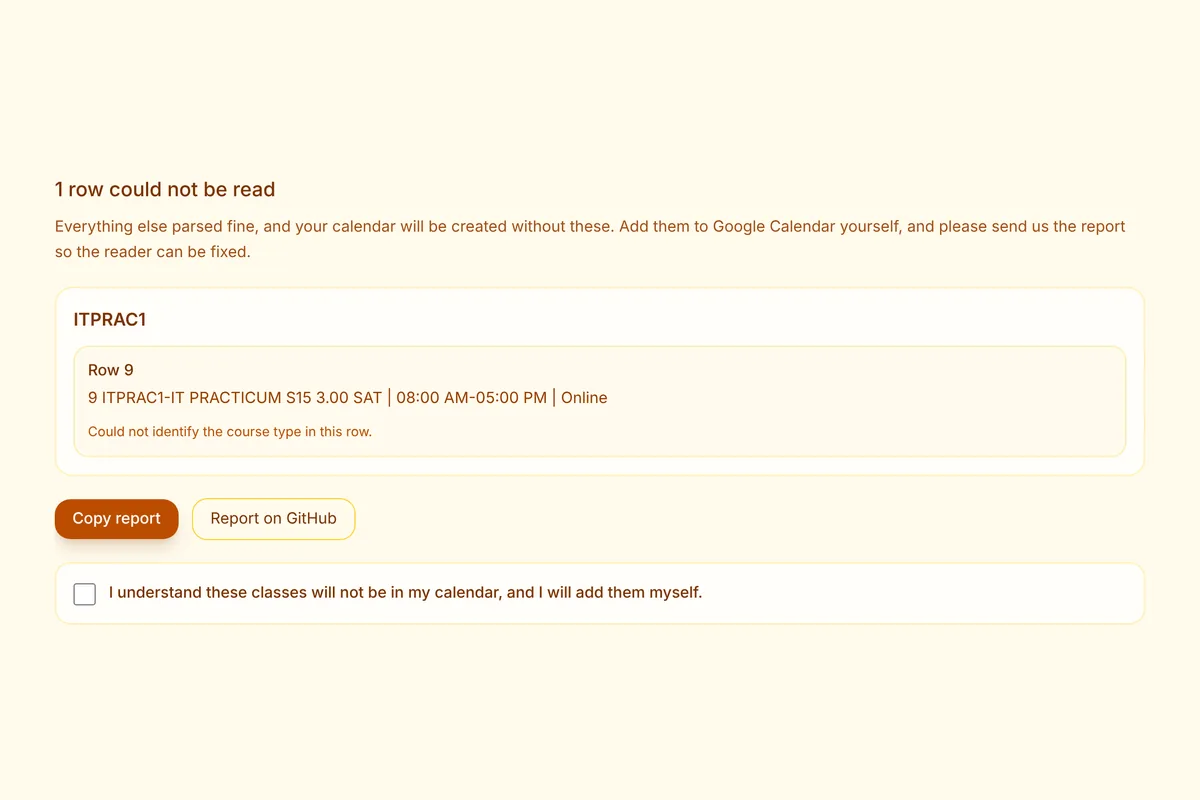
| A BSIT student's "Practicum / Internship" row came back unreadable, a real class left to add by hand | A tester's own EAF | The reader accepts any course type by its shape, and when a row still fails, names the exact field |
| A seminar that meets once became 14 weekly events | The sample forms | A "meets only once" question for seminars and practicums, unticked by default |
Before and after
The student does one upload and three choices, instead of building the term event by event.
-
Before, by hand: Open the EAF PDF and read it line by line
Read
After, with EAF Schedulr: Upload the EAF PDF once
-
Before, by hand: Make a Google Calendar event for every class meeting
Create
After, with EAF Schedulr: Every meeting read from the form: day, time and room
-
Before, by hand: Set each event to repeat weekly and pick its end date
Repeat
After, with EAF Schedulr: Weekly for the term length you set, 14 weeks by default
-
Before, by hand: Type each room, or Online, into every event
Rooms
After, with EAF Schedulr: Room or Online carried over from the form
-
Before, by hand: Make a one-off event, or leave it repeating by mistake
Recollect
After, with EAF Schedulr: One timed event on the date you pick, checked against the form's weekday
-
Before, by hand: Edit recurring events one by one when the schedule changes
Change
After, with EAF Schedulr: Upload the new EAF and import a fresh file
-
Before, by hand: A mistyped or missing class is found when you miss it
Miss
After, with EAF Schedulr: Any row it can't read is listed before you download
The system
A React and TypeScript front end talks to a Flask back end through three endpoints: one reads the form, one builds the calendar, one hands over the file. Follow the upload:
- Checked twice: the browser checks a recollection date against the form's weekday as the student picks it, and the server checks again before building anything.
- Nothing kept: the PDF is read in memory, the calendar file sits behind a link that works once and expires after 10 minutes, and nothing is written to disk at any stage.
- Quiet logs: the server logs counts and course codes only, so a format change shows up as a spike in unreadable rows without recording anyone's schedule.
- Tests on real shapes: 59 automated tests. Golden files pin the full parsed result of 4 real EAFs, anonymised by a script that fails if any ID number survives, alongside named tests for the rules that matter.
From an EAF row to a calendar file
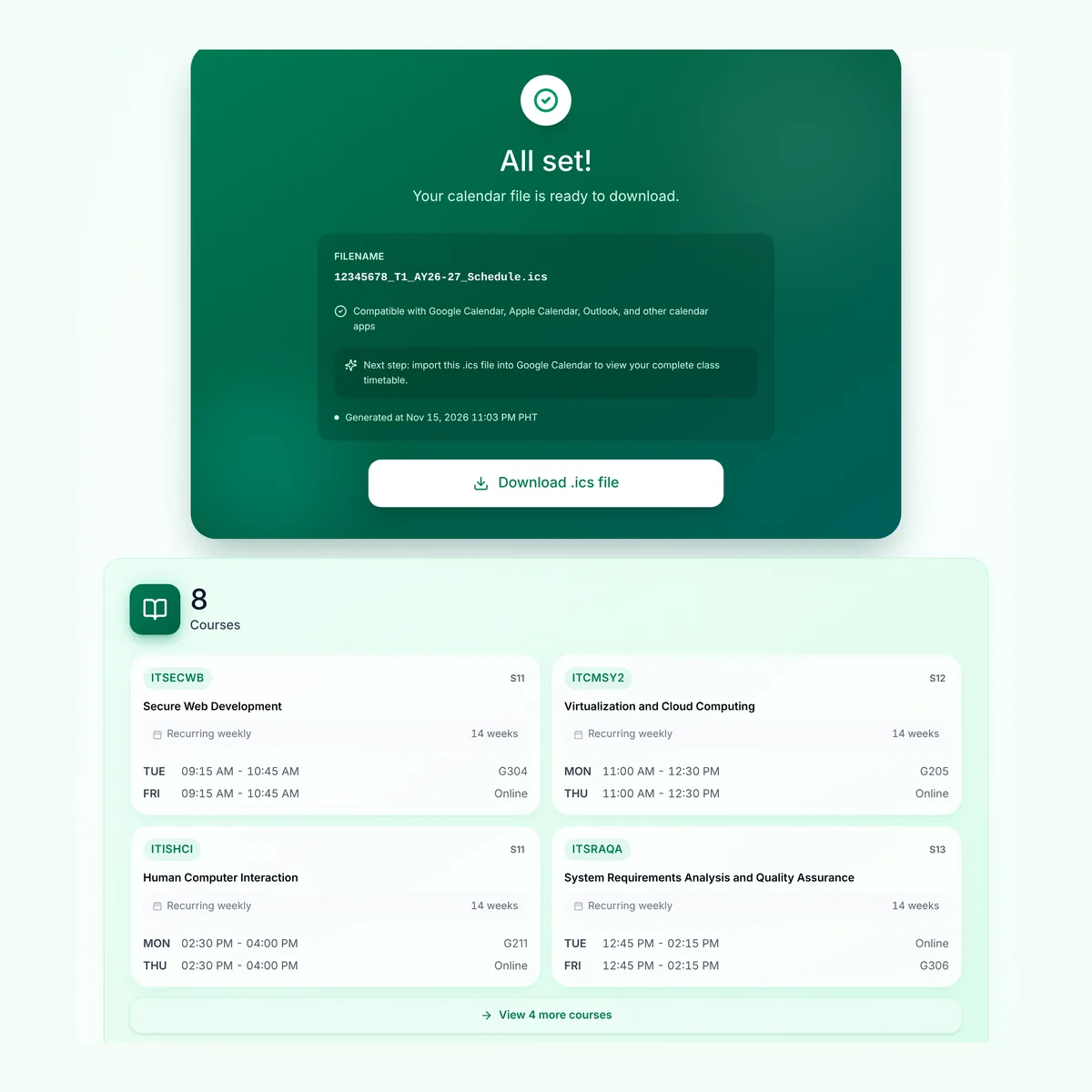
An .ics file is a calendar in plain text, in a format called iCalendar that Google Calendar, Apple Calendar and Outlook all read. Each event is a short block: when it starts and ends, what it is, where it is, and whether it repeats. EAF Schedulr's job is to turn each row of the form into those blocks.
Take one row from a made-up EAF. Secure Web Development meets twice a week:
1 ITSECWB-SECURE WEB DEVELOPMENT Lecture S11 3.00
  TUE | 09:15 AM-10:45 AM | G304,  FRI | 09:15 AM-10:45 AM | Online
That row becomes two events, one per meeting day. With a term starting Monday 24 August and 14 weeks, the Tuesday class comes out like this (each event's ID and timestamp lines are left out here):
BEGIN:VEVENT
DTSTART;TZID=Asia/Manila:20260825T091500    first Tuesday of term, 9:15 AM
DTEND;TZID=Asia/Manila:20260825T104500      10:45 AM, Philippine time
RRULE:FREQ=WEEKLY;WKST=SU;COUNT=14;BYDAY=TU  weekly, 14 times
SUMMARY:ITSECWB S11                          code and section
LOCATION:G304                                room, or Online
END:VEVENT
A recollection is the same block without the repeat line. It happens once, on the date the student picked:
BEGIN:VEVENT
DTSTART;TZID=Asia/Manila:20261014T080000
DTEND;TZID=Asia/Manila:20261014T170000
SUMMARY:LASARE3 C05
LOCATION:A1201
END:VEVENT
Eight courses on that form become 12 events, because two-day classes become two. To use the file, open Google Calendar on the web, go to Settings, then Import & export, choose the file and the calendar to add it to, and import. Importing into a new, empty calendar makes the whole term easy to remove later. Apple Calendar and Outlook open the same file.
Key decisions
Show unreadable rows; never guess
- choice
- A row the parser can't read is listed for the student, with the field it failed on. They tick that they'll add those classes themselves before they can download, and can copy a report so the reader gets fixed.
- instead of
- Skipping rows that don't match, or filling them in with a best guess.
- why
- A calendar that is silently wrong is worse than one that says what it missed. A student who finds a missing class by missing it has been failed twice. This is the decision I'd point to first.
A file, not a sync
- choice
- Hand the student a standard
.icsfile to import. - instead of
- Signing in with Google and writing straight into their calendar.
- why
- Writing to someone's calendar needs Google's verification for a sensitive permission, a sign-in step and tokens to look after. A file needs none of that, and it works the same in Apple Calendar and Outlook.
Nothing on disk
- choice
- Read the form in memory and serve the calendar once, through a link that expires after 10 minutes.
- instead of
- Saving uploads or generated calendars, even briefly.
- why
- It's students' enrolment data. The cost is that the server must run as one process, because the links live in its memory.
Ask which sessions meet once
- choice
- Offer a "meets only once" checkbox on seminars and practicums, unticked by default, with the date pre-filled to the first meeting after the term starts.
- instead of
- Keeping a list of course codes that meet once.
- why
- Every program has its own orientations, so a list would only grow after someone's calendar was already wrong. Unticked by default, because guessing wrong the other way would quietly drop a real weekly class.
Turning it around
It went live on 2 May 2026. The problems that mattered came from real forms and real conditions, and most were fixed in a revision at the end of August.
- The parser only knew four course types. It matched Lecture, Laboratory, Seminar / Workshop and Research / Capstone, and that list had only ever grown after a broken upload. A BSIT form's "Practicum / Internship" row failed, handing a real class back to the student. The fix reads the course type by its shape instead of from a list, and when a row still fails, the report names the field it stopped at.
- Every student shared one rate limit. Behind Render's router, every request looked like it came from the same address, so the limit of 20 requests a minute would have throttled the whole site at once. I caught it before it reached production. The limit now keys on each student's own address, and I raised it to 60, because campus wifi puts a whole lecture hall behind one address at the start of term.
- One-time sessions repeated weekly. Every course became a 14-week series, so an orientation that meets once left 13 events to delete. Students now answer the question themselves.
- Long rows broke the page on phones. A malformed row is long by nature: one 90-character run pushed the page 489 pixels sideways on a 375-pixel screen. Text now wraps, and panels shrink to fit.
Alongside the fixes, the parser got its tests: the golden files and named rules above, so the next format change shows up as a failing test instead of a student's missing class.
Outcome
It is live at animo.li/eafschedulr (opens in a new tab), and students use it when a term starts.
- Usage: 75 people, 118 sessions and 369 page views in 2026, to 15 November (Google Analytics). Use comes in two spikes: early May, when it launched just as Term 3 of AY 2025-2026 began (classes from 11 May), and again in late August. In the 90 days to 15 November alone: 38 people and 51 sessions.
- How to read those numbers: they count visits, not calendars made, and since 31 August only visitors who accept the consent banner are counted, so the real figure is higher. There is no count of calendars generated.
- Tested on real forms: students from several colleges confirmed it read their own EAFs, and 59 automated tests pass against 4 anonymised ones.
What I'd do differently
- Write the parser tests before launch. It went live on 2 May; the tests came on 26 August. Until then, every unknown course type was found by a student's broken upload.
- Do the hardening before enlistment, not after students arrive. Use comes in bursts, right after students get their EAFs, and the August fixes landed after that week's spike. I'd plan the work around DLSU's enlistment calendar, not my free time.
- Ask for analytics consent from day one. Analytics went in on 2 May and loaded without asking until 31 August. For a tool whose promise is that a student's data leaves no trace, consent should have come first.
- Never trust a closed list. Course types and recollection codes were both hard-coded lists that only grew after something broke. Reading the shape of the data instead came late.
- Market it, not just build it. I shared it with friends and org mates, but never had time to promote it, so most students who could use it never heard of it. That, more than anything in the code, is why the numbers are small. Next time I'd plan the launch like a feature: a post in student groups when enlistment opens, and a student org to share it.
Credits
Built solo. A friend from RVRCOB asked for it, and friends, their friends and org mates from several DLSU colleges tested it with their own EAFs. During the August revision I used an AI assistant to help write the tests and commit messages. Code: github.com/Stilsi-dev/EAFSchedulr (opens in a new tab), MIT licensed. EAF Schedulr is unofficial and not affiliated with De La Salle University.
end of eaf.schedulr.md. next: ~/work